
How to write AI and SEO friendly blog posts that get found (2026 guide)

I'm slowly writing and exploring the principles behind what I'm calling Calm Marketing – my own values-aligned approach to becoming discoverable online without burning yourself out or having to be online all the time. This post is part of that. Read more about the Calm Marketing Methodology.
When it comes to being discoverable through search in 2026, Google and AI tools have cracked down on content quality. Because when anyone can write anything these days using AI, how do we know what's trustworthy?
Search tools actually want to surface the most credible and most helpful content so they are pretty much asking the same question you are when you’re searching for info or considering buying something: is this business real and trustworthy? Do they actually know what they're talking about?
So when you’re writing a blog post in 2026, you need to be mindful of showing search tools that you’re trustworthy and experienced in your topic of choice.
How do you do that? Don’t worry, I got you! That’s what I’m covering in this article.
If you've been blogging and wondering why the reads aren’t coming (or maybe you gave up on blogging because you didn’t see the return on investment), this article is for you. I'm going to walk you through exactly how to write an SEO friendly blog post so that Google and AI tools can find it, understand it, they trust it and therefore show it to the people who need it.
Table of Contents
Main takeaways
Google still accounts for over 90% of search traffic. That said, AI search is growing much faster than Google. So, at this point in time, it's worth optimising for both.
Original content that adds something new to the conversation is one of the top factors that determines whether your content gets surfaced and recommended by Google and AI.
Google looks for and prioritises helpful, reliable information that has been created to benefit people.
Articles must show that you’re experienced and trustworthy through things like first-hand experience, case studies, testimonials, findings, an author bio and credible sources.
Use your client’s language so that search tools can match your content to their search.
AI-generated rehashes of what's already online (AI-slop) don’t perform well.
SEO technical foundations such as clear headings, clean urls, optimised images etc are still relevant and important
Ranking on page 1 of Google doesn't automatically mean you'll show up in AI results but by doing the foundational work in this article, it will give you a good chance of being found and recommended across both.
Why blogging is so powerful (when it’s done right)
Every article you write teaches Google and AI tools about who you are, who you help, what you do and what you specialise in. Over time, a library of well-written, well-structured posts builds search tool trust in your website as a reliable, expert resource on your subject.
Once you have that trust, Google starts showing your website to more people. Not just that one article but your entire website gets shown to more people – that means, your offerings get more visibility too!
For AI tools, the more high-quality content you have on your subject, the more evidence there is that you know what you're talking about and therefore the more likely they are to recommend you when someone asks.
And unlike social media (where a post disappears within a day or two so you have to keep ‘feeding the beast’), well-written blog articles keep working for you in the background for months, sometimes years helping your discoverability to grow exponentially over time.
This is a completely non-performative, pressure-free way to find clients, without you having to be online every day to make it happen (it’s part of the Calm Marketing methodology).
For those of you who want the data to prove it – I’ve got you.
Google ranking factors
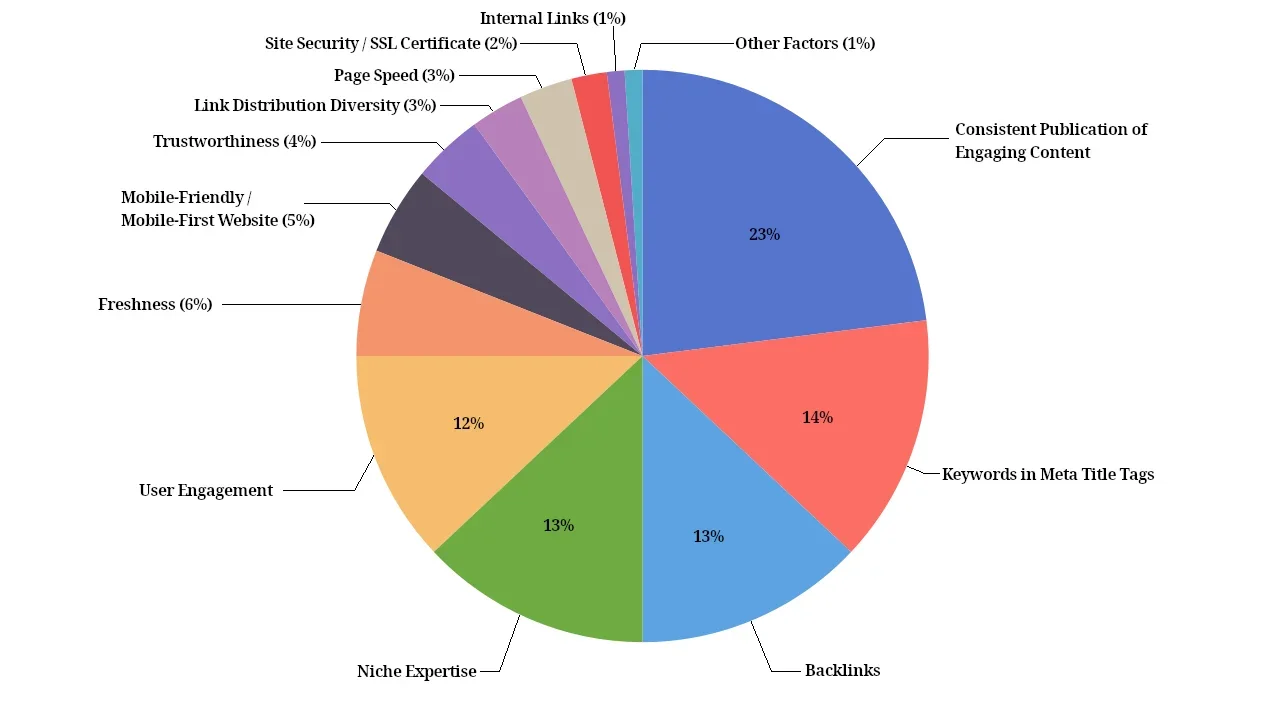
This chart shows that Google prioritises websites that consistently publish high-quality content. Other key ranking factors include niche expertise and freshness – all of which blogging helps you build over time.
Source: FirstPageSage
AI Ranking Factors
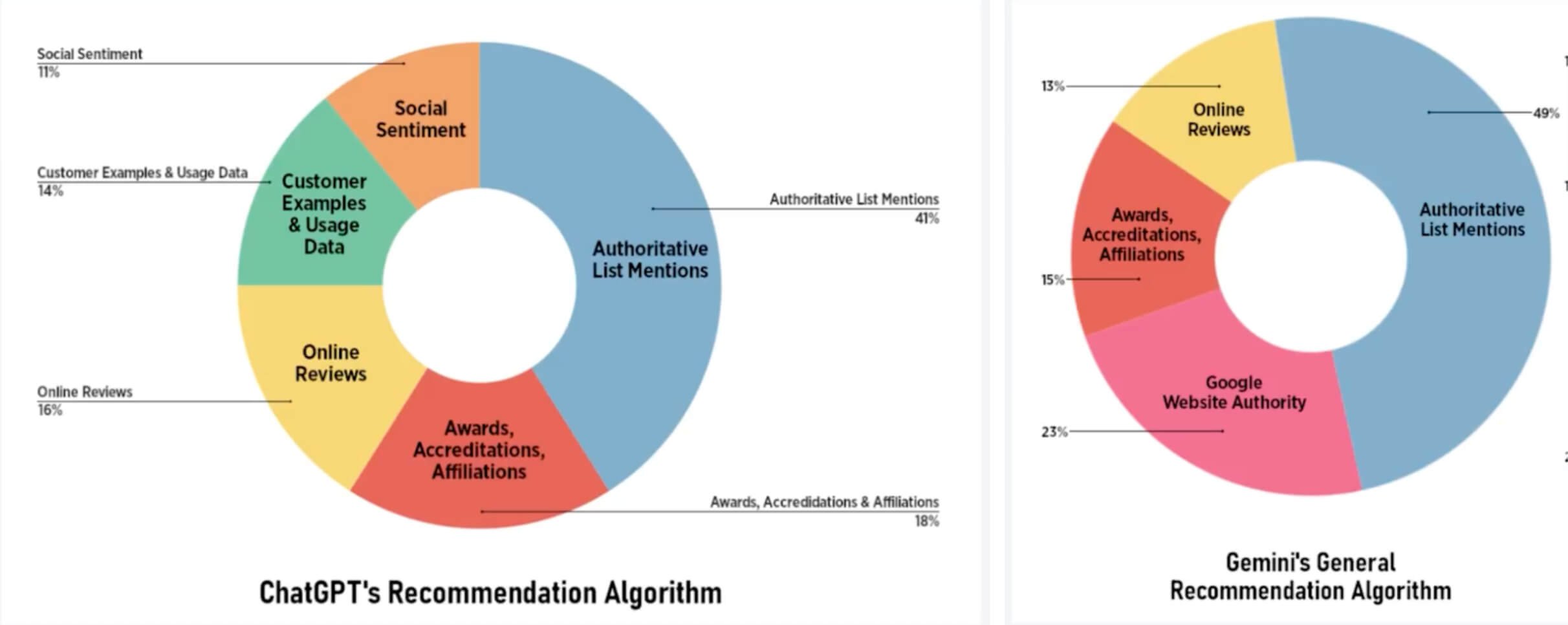
ChatGPT is more likely to recommend businesses who demonstrate authority in their field – and writing blog articles, like roundups or client case studies, is one of the clearest ways to do that. Gemini draws heavily from Google's rankings, so the work you do to improve your Google discoverability strengthens your chances of showing up in Gemini, too.
Source: FirstPageSage
How to write an SEO friendly blog post – the five things that make the biggest difference
Many articles out there on this topic focus on the technical aspects of an SEO friendly blog post (and don’t worry, we’ll cover that too). But I would argue that the technical stuff is much less important than what I’m about to share with you here – especially in the AI era.
1. Use your client's language
Here’s the one thing to remember when it comes to being found in search – the language you use to describe a particular topic can often be different from the language your clients use to search for it.
So if your blog post uses your language only and not theirs, Google (and AI tools) simply can't match your content to their search. It’s really that simple.
Therefore, finding the words (these are called keywords) your clients actually use to describe the topic you’re writing about – and then using those keywords naturally throughout your writing – is the single most important thing you can do for your discoverability.
Honestly, if you were to do none of the other steps in this article other than this one, you’d likely see an improvement in your blog articles being found.
If you’d like help working out what words and phrases your clients are using, I teach exactly how to do this in The Calm Marketing Collection.
2. Include your unique perspective
One of the big barriers that often stops people blogging consistently is the misconception that ‘writing for search’ means writing dry and generic content where you sound like a robot. What a drag!
But honestly, it really doesn’t have to be that way. In fact, the articles that do the best are actually the ones where you bring in your own experience, opinion and perspective to it. It’s being willing to say the things no one else is saying on the topic and even challenge common assumptions in your industry (just like I’m doing here in these four points).
When you do that, you stand out. Your readers remember you and search tools reward it.
For the last six months, I’ve been following this idea of writing articles that fill the gaps of what no one else is saying in my industry.
Here's a snapshot of my results from Google Search Console, filtered to blog articles only.

You can see the growth that’s happened over this time. And it’s no mistake that it’s the articles where I regularly share my unique point of view, experience and messaging that perform the best.
Many of these articles are now sitting on page 1 of Google and being recommended to people through AI, bringing in consistent clicks and sales of the digital products I link to from each post.
And not only that, I’m really having a great time blogging! Because I’m writing about stuff I’m passionate and excited about. I’m still using my clients language (keywords) and following the SEO guidelines but I’m getting creative with how I do it.
You don't just have to take my word for it though. Google confirmed in 2025 that they are actively giving more ranking weight to content that brings a unique perspective.
And research from InfuseOS, based on analysis of over 10,000 queries across ChatGPT, Gemini, Claude and Google AI, found the same thing is true across AI tools. Original content that adds something new to the conversation is one of the top factors that determines whether your content gets recommended.
Here’s how I do it: before I start writing anything, I take a quick peek at what articles are already ranking on page 1 of Google for my topic. Then I ask myself:
What are these articles missing?
What’s my unique perspective on this topic?
What can I add to the conversation that hasn’t been said before?
What does my specific audience want to know about this topic?
3. Write for people (not for search)
Google's guidance on this is pretty clear. What they're looking for and what they prioritise is “helpful, reliable information that has been created to benefit people”.
The same principles apply to AI search. These tools are designed to recommend the most genuinely useful answer to a question, which means it’s pretty unlikely that generic, rehashed content is going to get recommended.
If you’re just churning out content to game the search algorithms and attract search visits, rather than because you want to be genuinely helpful to your readers, it’s not going to be effective.
Before you hit publish, ask yourself these questions which come straight from Google's guidelines on what helpful content actually looks like:
Does this content provide original information – not just a summary of what's already out there?
After reading this, will someone feel they've learned enough to actually achieve their goal?
Is this the kind of page you'd want to bookmark or share with a friend?
Does it clearly demonstrate first-hand expertise and real depth of knowledge?
Would someone leave feeling like they need to go and search again to get better information elsewhere?
4. Show that you’re experienced and trustworthy
There's a framework Google uses to evaluate content called E-E-A-T – Experience, Expertise, Authoritativeness and Trust. Trust being the most important factor. And it shapes a lot of how Google decides what content to show.
And it's not just Google that uses this framework. According to this study, E-E-A-T is one of the top ranking factors across ChatGPT, Gemini and Claude too.
It’s also worth keeping in mind that for those working in health, wellness or mental health you need to pay even more attention to this. Content that could influence someone's health is held to a higher standard. Which means if you're a naturopath, therapist, coach, nutritionist, acupuncturist etc, demonstrating that you’re experienced and trustworthy matters more than it might for other industries.
Here’s how to demonstrate E-E-A-T in your blog articles:
Write from your first-hand experience, instead of summarising what others have said
Share case studies, testimonials, client results, experiments and findings (just like I did above with the Google chart)
Be clear about who you are and what your background is (your author bio helps here – more on that in the steps below)
Link to credible sources when you reference data or research
Make sure your About page clearly explains your qualifications and experience
5. Human-written content wins (stop regurgitating direct from AI)
By all means, use AI to help you do your research, structure your ideas and draft sections you find tedious (I totally do this).
However, if you're publishing blog posts that are purely AI-generated rehashes of what's already online, with little thought and no editing put into them, you won't be remembered, recommended or trusted.
There’s nothing unique about these articles, they certainly don’t demonstrate that you’re trustworthy or experienced in what you’re talking about and – the saddest part – your own distinct voice is lost to the AI monotony.
And, actually, you’ve got less chance of ranking in the top positions in Google when your content is AI generated. Semrush analysed 42,000 blog posts and found that 80% of the articles sitting at the very top of Google (in position 1) were written by real people!
Now I’ve got that off my chest (ha!), let’s jump into the technical aspects.
How to structure an SEO friendly blog post – the technical stuff
1. Write a clear blog title
When it comes to blog titles – clear beats clever, my friend.
Your blog title should use simple language that describes what’s in the article.
And it must include your keyword – because this is what is going to help search tools match your article with people who are searching for it.
"How to write an SEO friendly blog post" will outperform "The secret sauce your blog is missing" every time – because the first one matches what someone actually types into search (and it’s also way clearer too).
2. Clean up your blog url
Your blog URL is the web address for the post. It needs to be formatted correctly as it’s one of the signals that search tools actually use to understand what your article is about.
Here’s some simple guidelines for having a clean blog url:
Keep it short (4-6 words is ideal)
Use hyphens between each word
Include your keyword
A clean URL looks like this: yourwebsite.com/blog/seo-friendly-blog-post
Messy URLs look like this:
yourwebsite.com/blog/post-1847 (does not include the keyword)
yourwebsite.com/blog/seofriendlyblogpost (words not separated by hyphens)
yourwebsite.com/blog/how-to-write-an-seo-friendly-blog-post-that-gets-found-online (way too long)
3. Write your SEO page title and description
The SEO page title and description are the two pieces of text that appear in Google search results. They’re important because it’s very often the first thing a potential reader sees and they use it to decide whether to click through to your article, so you want to make sure they are accurate and compelling.

SEO page title: This is the blue clickable link. It should be 50–60 characters including spaces and include your keyword.
SEO page description: This is the short summary underneath the SEO page title. Keep it between 150–160 characters including spaces and again, include your keyword naturally.
Most website platforms have a dedicated field for these in your page settings. Don't leave them blank because otherwise Google will pull random text from your article.
4. Use headings and sub-headings throughout
Breaking your article into sections with clear headings makes the article easier for your reader to navigate and it helps search tools understand the structure and content of your post.
Headings tell the reader (and search tools) what’s in the article and what each section is about. Use your main heading (H1) for the article title, and sub-headings (H2, H3) to organise the content within it.
Bonus SEO tip: Try to include your keyword in at least one of the sub-headings, naturally where it fits.
5. Optimise your images
Resize and compress your images
Large image files can slow down your page, which makes it harder (and more frustrating) for visitors to browse. A slow-loading page can lead to people clicking away before they even read your content. Google and AI tools also consider page speed when deciding how to rank and when to recommend your article.
As a general rule of thumb, before you upload an image to your blog article, resize images to around 1000-1500px wide, and run them through a free tool like TinyPNG to reduce the file size. Try to keep each image under 250KB.
Add image alt-text
Alt-text is a short written description that tells search tools (and screen readers) what your image is showing. It helps make your website more inclusive for people using assistive technology and adds one more nudge to search tools about what your blog post is about.
6. Add a table of contents
A table of contents at the top of your blog posts (just like I’ve added in this article) improves your visitor’s experience, which can indirectly benefit SEO.
There's also some evidence that it can improve your click-through rate in search results. Google sometimes pulls the table of contents items and displays them as additional links underneath your search snippet in search results – giving people a preview of what's covered before they even click through.
For Squarespace websites, I’m a big fan of this Table of Contents plugin.
7. Link to other relevant blog articles
As you write your article, look for natural places to link to other relevant blog posts that you’ve already written. 2-3 internal links is a good aim.
Internal links like this help Google to understand and discover your pages and your overall site structure. They also pass ‘link juice’ (bahahaha I love that term), which is where, if one of your articles is ranking really well in search, it can help boost the SEO value of other pages it links to.
Internal links also guide your reader to more content on your website that is helpful for them, keeping them on your site longer and reducing your bounce rate (which benefits SEO too)
8. Add an author bio
Including a short author bio at the end of your posts helps both your readers and Google understand who is behind the content.
It adds credibility, builds trust, and in Google's own words it is one of the signals used to assess whether the content comes from a real, qualified person (helping with E-E-A-T which we spoke about earlier).
This is such a simple thing to do – it takes about 5 minutes but has big benefits to your articles.
On Squarespace, this is how to set that up.
9. End with a clear call to action linked to a relevant sales page
Like I said in part 1 of this series, every blog post should end with an invitation for your reader to take the next step. This is called a ‘call to action’ or CTA.
By the time someone reaches the end of your article, if you’ve done your job well, they’re probably thinking ‘what’s next?’ So this is one of the most natural ways to move a reader to your offerings.
But not only that, linking to a relevant sales page from your blog article helps:
Your sales page to be more competitive in search – this type of linking between blog articles and service page signals to search engines that your service page is important and supported by relevant expertise. This builds authority and trust, making the page more competitive.
To create additional pathways for people to find you – every search-optimised blog post becomes a new doorway into your business. Instead of relying on just your sales page to do all the work, your website becomes a connected system. Someone searches a question and finds your blog post. They read it, it resonates, so then they follow the trail to your services.
Bonus Tips
Be consistent
Google prioritise websites that consistently publish high-quality content, as it sees them as active, relevant and up to date. With that it mind, when it comes to blogging, consistency matters more than intensity.
It’s far better to publish one article each month on a regular schedule than to post every week for a short burst and then go quiet for months. So pick a blogging schedule that feels doable for you.
As a practical starting point, if your site is brand new, aim to publish at least two articles a month. If your site has been around for a while and has decent discoverability already, one article a month can be enough to continue to build momentum and authority over time without adding unnecessary pressure.
Read my article on how I approach this.
Regularly review and update your articles
Google and AI tools love fresh, up-to-date content but you don't always have to write something new. Instead you can revisit an older article, review how it’s performing in search, update it with new thoughts, ideas and data, then republish it (with a new publish date).
Use an SEO tool to audit your blog article
Once your post is live, running it through an SEO audit tool can catch things you might have missed, such as image sizes, keyword usage, broken links or other technical issues.
My recommended tool for Squarespace is the SEO Space plugin (that’s an affiliate link btw). You install the Chrome extension, enter your keyword and it gives you an overview of exactly what to fix.
Blog post SEO checklist
Run through this list before you hit publish on your next blog article:
Provides original information, not just a summary of what's already out there
Contains helpful information that will benefit people
Demonstrates your first-hand experience and depth of knowledge
Free of AI slop and written in your voice
Uses your client’s language (keywords)
Blog title is clear and includes the keyword
URL slug is clean, hyphenated, and includes the keyword (4–6 words)
SEO page title added – 50–60 characters, includes keyword
SEO page description added – 150–160 characters, includes keyword
Headings and sub-headings used throughout the article
Images resized and compressed (under 250KB each)
Alt-text added to all images
Table of contents added (for longer posts)
2–3 internal links to other relevant blog posts
Author bio is showing
One call to action linking to a relevant sales page
A companion guide to support you with this…
If you’re looking for more support in making your blog articles (and entire website) discoverable in search and AI tools, The Calm Marketing Collection can help. This is a set of jargon-free DIY SEO guidebooks that walk you through how to find the words your clients are actually typing into search and then write website pages and blog posts that actually get found.
Frequently asked questions
-
An SEO friendly blog post is one that's been structured so that Google and AI tools can find it, understand it and show it to the right people. That means using your client’s language when describing the topic and structuring your article correctly with a clear title, clean URL, SEO page title and description, sub-headings and optimised images. The content must also be genuinely helpful, written for people (not to game the search algorithm) and demonstrate that you are experienced and trustworthy in the topic you are writing about.
-
They sure are. Google prioritises websites that regularly publish high-quality content, and other key ranking factors like niche expertise and freshness are all things blogging helps you build over time.
And it's not just Google. AI tools look for what's called topical depth and authority. This just means that they tend to favour websites that cover a subject thoroughly and demonstrate expertise across it, rather than sites that publish lots of surface-level content. A library of well-written blog posts that go deep on the topics you’re experienced and knowledgeable in builds that kind of authority that AI tools look for.
-
Take a look at what articles are already on page 1 of Google for your topic and write somewhere in that range. That said, the ideal length is really whatever it takes to answer your reader's question properly. Don't pad out your article with AI-generated filler just to hit a word count. Search engines don’t reward that.
-
Not at all. It has changed the way that we blog though. Now that anyone can thrash out an article on any topic using AI, it’s super important that your blog articles have depth, show your unique perspective, are genuinely helpful for people and demonstrate that you are experienced and trustworthy in the topic you’re writing about. This is what Google and AI tools prioritise. As such, SEO industry leaders are now recommending that you write less but longer, more in-depth articles. It’s very much about quality over quantity.
-
Well, actually AI hasn’t taken over yet. At the time of writing this article, Google still accounts for over 90.2% of search traffic compared to AI search's 9.8% (source). That said, AI search is growing much faster than Google. So right now, it's worth paying attention to both.
The good news is you don't need to learn an entirely different strategy for each. The four things I cover in this article – using your client's language, bringing your unique perspective, writing genuinely helpful content, and demonstrating that you’re experienced and trustworthy – are the same signals both tools use to decide what to surface and recommend. The technical SEO foundations (clear structure, clean URLs, descriptive headings, optimised images) work the same way too.
-
Usually it comes down to one of two things: either the post wasn't set up to be found (which is what this article covers), or people are landing on it but clicking away because the experience of reading it isn't holding their attention. If it's the second one, part one of this series covers how to format your posts for readability.
-
I’ve included a blog SEO checklist in this article which is a great place to start before you publish. Once your post is live, you can also run it through the SEO Space plugin (that’s an affiliate link, btw) – it checks technical things like keyword placement, image sizes, and your meta fields and tells you exactly what to fix. Google Search Console (free) is also helpful for tracking how your posts perform over time.
-
Absolutely. Everything in this article is doable without any technical background. If you'd like a companion to help you work through it all – including how to find the right keywords and write pages and posts that get found – The Calm Marketing Collection – our DIY SEO guide for small businesses – was made for exactly that.
